Setup - Served Documents
Setup - Served Documents
Two pages in the Intake section of System Setup control how served documents reach your company. The Served Document Management page holds the service of process settings. The Served Document Channels page shows every route documents arrive by. This article covers both, and each part below names the page its settings live on.
 Served Document Manager™ Functionality. Both the 'Served Document Management page and the Served Document Channels page appear whether or not your company subscribes to Served Document Manager (SDM), because some of what they hold applies to every company. Settings that are specific to SDM appear only if SDM is enabled. For more information about the Served Document Manager product, see Safari Product Subscriptions.
Served Document Management
The Served Document Management page is the single place for service of process configuration.
Hours of Service
The hours of service used by ServePort are set here. They previously lived on the Company page - all service-related setup has been brought together on this page.
 NOTE: These hours also govern when Task Reminders are sent, which is between 8:00 AM and 8:00 PM in the company time zone set here. See Tasks - Reminders.
Enable Automatic Triager Assignment
This setting decides whether a new Intake Event waits on the New Intake page for someone to pick it up, or if it is routed to a Triager automatically.
No: the Intake Event is left unassigned and appears on the New Intake page.
Yes: a Triager is assigned using Assignment Pools, as follows:
- If every document identified in the Intake Event carries the same Subtype or External SDM Subtype, and that Subtype has an Assignment Pool for the Triager, the Triager is assigned from that pool.
- Otherwise the Triager is assigned from the default Assignment Pool specified on this page. This also covers an Intake Event with no classified documents, or one whose documents failed classification.
The practical effect of the default pool is that when automatic assignment is switched on, an Intake Event gets a Triager even where the Subtype has no pool of its own. It does not fall back to the unassigned list.
NOTE: If automatic assignment does not trigger for any reason, the Intake Event is simply left unassigned and appears on the New Intake page. The unassigned alert below is the backstop for that case.
NOTE: If automatic assignment does not trigger for any reason, the Intake Event is simply left unassigned and appears on the New Intake page. The unassigned alert below is the backstop for that case.
Send Unassigned Alert Emails
Subtypes already support an alert when a matter sits unassigned. The same protection is available for Intake Events, but as a single setting here that applies to every Intake Event rather than one configured Subtype by Subtype.
Send Unassigned Alert Emails is a Yes or No toggle, defaulting to No, and sits below Enable Automatic Triager Assignment. Setting it to Yes reveals two fields.
Alert Timing. Send email alert if Intake Event unassigned for [__] hours.
Alert Recipients. Select who receives the alert:
- Coordinator, checked by default
- Backup Coordinator, checked by default
- All other users with SDM access, not checked by default
- Additional Recipient, which adds further recipients in the same way as Subtypes
At least one recipient is required. If none is selected you will see: At least one recipient is required when the unassigned alert email is enabled.
Companies use this setting to manage the risk of an Intake Event sitting untouched.
Served Document Channels
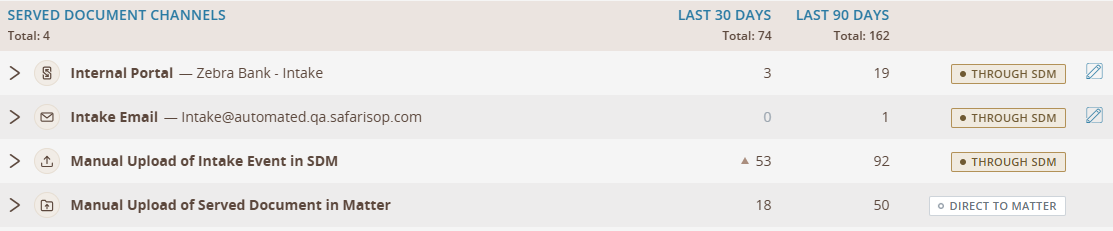
Legal documents reach your company through several routes at once: registered agents, headquarters and branch offices, mailrooms, documents uploaded by hand, ServePort, and more. The Served Document Channels page puts every route on a single page, so you can see what is configured without opening each setting in turn.
The channel list shows how many Intake Events each channel received in the LAST 30 DAYS and LAST 90 DAYS, with totals at the top. An arrow next to a count shows that volume is trending up or down compared to the 90 day average.
Channel Cards
Each channel appears as a card. A card gives you two things:
- Links to the detail and configuration options for that channel.
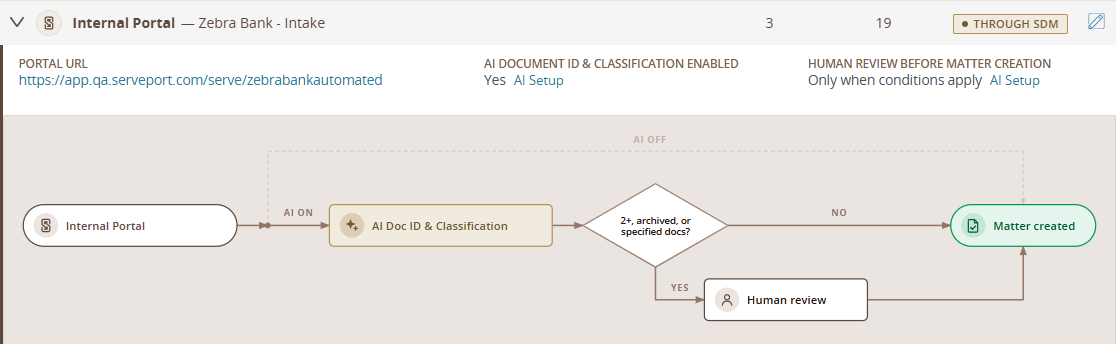
- A flowchart showing how documents move through that channel, drawn from that channel's current configuration.
The flowchart is the part worth spending time on. It reflects your settings, so it shows what your configuration actually does. Each card shows Human Review Before Matter Creation, with a link to AI Setup. When it is set to Only when conditions apply, the review step in the flowchart lists the conditions your company checked, for example “2+, archived, or specified docs?” See Setup - AI.
Links That Have Moved
Several links that previously sat directly under Intake in System Setup are now reached through this page. Note that nothing has been removed. If a setting you used to reach from the Intake section is no longer listed there, it is on the card for its channel.
Is there a question we haven't answered? Please send it to us at support@safarilaw.com